Code References
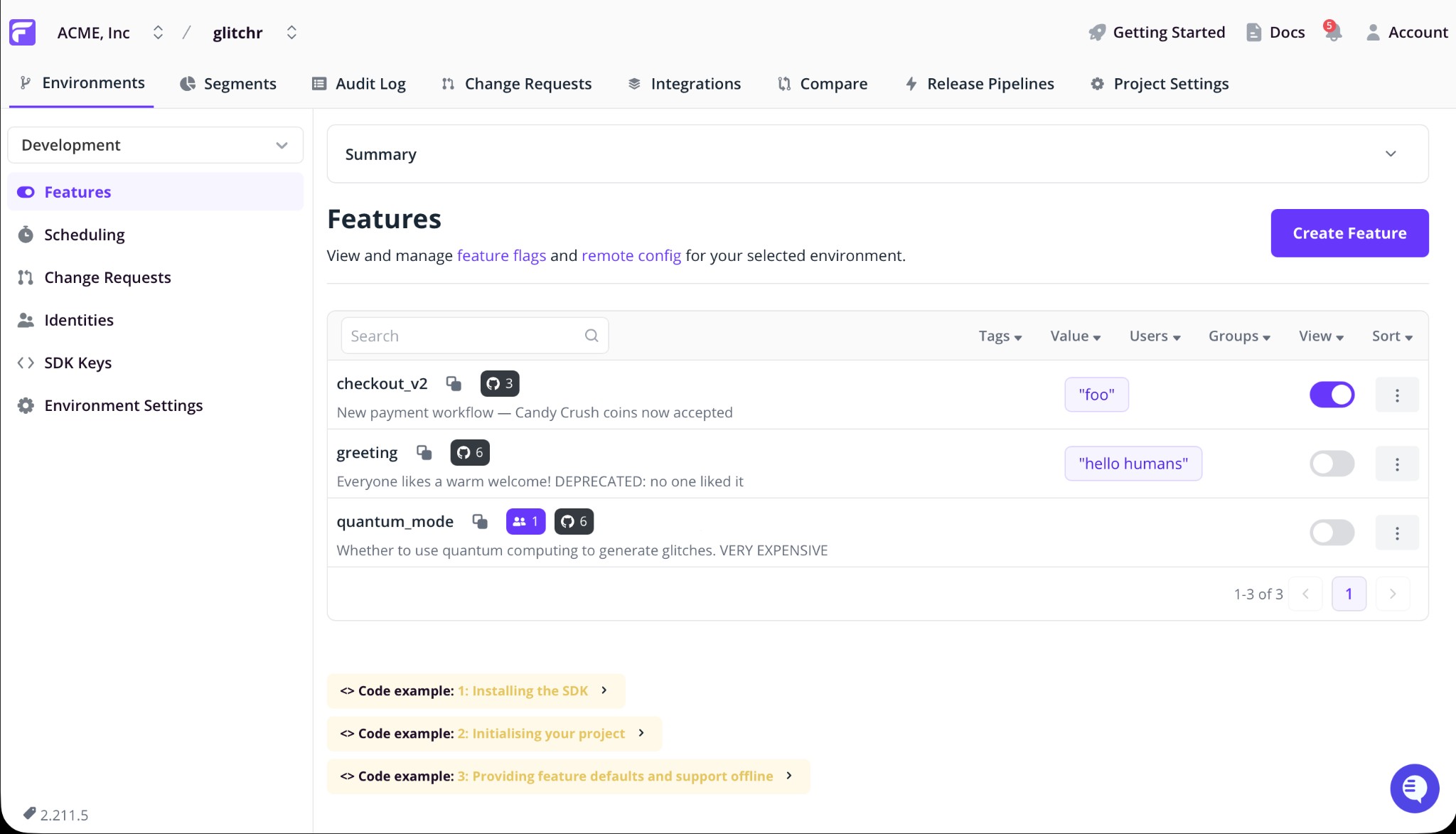
Flagsmith Code References provide visibility into where feature flags are evaluated in your codebase. By linking your source code metadata to the Flagsmith dashboard, you can identify stale flags, simplify audits, and safely manage technical debt.
How it Works
Code References are populated by a scanning tool that identifies flag evaluations within your repository.
- Local Scan: The runner searches your repository for feature flag evaluations. The scanner utilizes
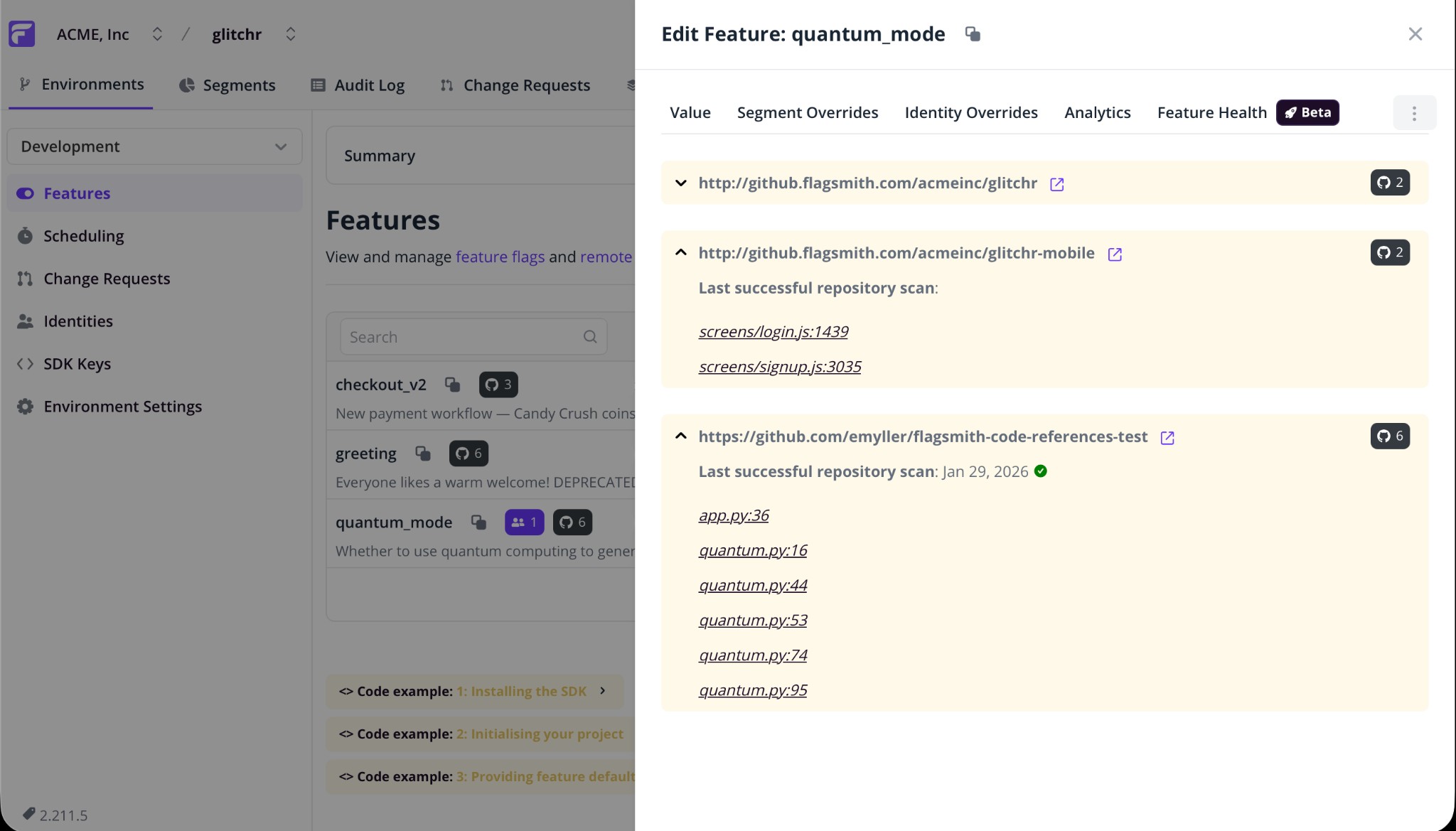
git ls-filesto identify relevant files, ensuring it only scans code tracked by your version control system. - Metadata Sync: The scanner identifies the file path and line number for each evaluation and sends this metadata to the Flagsmith Admin API.
- Visualization: These references are displayed within the Code References tab of the corresponding feature flag in the Flagsmith dashboard.
Your source code never leaves your runner. Flagsmith does not receive, store, or have access to your actual code. Only file paths and line numbers are transmitted to map the evaluations to your dashboard. No context snippets or surrounding lines of code are ever sent to Flagsmith.
Set up Code References
Code References currently integrates with GitHub, with support for other version control providers planned for future releases.
GitHub
To authorize the scan, you must first configure your project credentials within your GitHub repository settings under Settings > Secrets and variables > Actions.
FLAGSMITH_CODE_REFERENCES_API_KEY(Secret): Generate an Admin API Key in your Flagsmith dashboard under Organisation Settings > API Keys.FLAGSMITH_PROJECT_ID(Variable): This is the integer ID of your project, found in the browser URL when viewing your project:app.flagsmith.com/project/{ID}/.
1. Simple configuration (Reusable Workflow)
The quickest way to get started is using the Flagsmith reusable workflow. This handles the identification and synchronization of references automatically.
# .github/workflows/flagsmith-code-references.yml
name: Flagsmith Code References

on:
  push:
    branches:
      - main
  schedule:
    - cron: '0 8 * * *' # Daily sync

jobs:
  collect-code-references:
    name: Collect
    uses: Flagsmith/ci/.github/workflows/collect-code-references.yml@v1.0.0
    with:
      flagsmith_project_id: ${{ vars.FLAGSMITH_PROJECT_ID }}
      # Required for self-hosted Flagsmith instances:
      flagsmith_admin_api_url: https://api.flagsmith.com
    secrets:
      flagsmith_admin_api_key: ${{ secrets.FLAGSMITH_CODE_REFERENCES_API_KEY }}
2. Advanced configuration (Individual Actions)
For environments requiring custom logic or specific runner configurations, you can use the discrete actions that compose the workflow.
# .github/workflows/flagsmith-code-references.yml
name: Flagsmith Code References

on:
  push:
    branches:
      - main

jobs:
  collect-code-references:
    name: Collect code references
    runs-on: ubuntu-latest
    permissions:
      contents: read
    env:
      FLAGSMITH_API_URL: https://api.flagsmith.com
    steps:
      - name: Checkout code
        uses: actions/checkout@v4

      - name: Fetch feature names
        id: fetch-feature-names
        uses: Flagsmith/ci/fetch-feature-names@v1.0.0
        with:
          flagsmith_project_id: ${{ vars.FLAGSMITH_PROJECT_ID }}
          flagsmith_admin_api_url: ${{ env.FLAGSMITH_API_URL }}
          flagsmith_admin_api_key: ${{ secrets.FLAGSMITH_CODE_REFERENCES_API_KEY }}

      - name: Scan code references
        id: scan-code-references
        uses: Flagsmith/ci/scan-code-references@v1.0.0
        with:
          feature_names: ${{ steps.fetch-feature-names.outputs.feature_names }}

      - name: Upload code references
        uses: Flagsmith/ci/upload-code-references@v1.0.0
        with:
          code_references: ${{ steps.scan-code-references.outputs.code_references }}
          flagsmith_project_id: ${{ vars.FLAGSMITH_PROJECT_ID }}
          flagsmith_admin_api_url: ${{ env.FLAGSMITH_API_URL }}
          flagsmith_admin_api_key: ${{ secrets.FLAGSMITH_CODE_REFERENCES_API_KEY }}
          repository_url: ${{ github.server_url }}/${{ github.repository }}
          revision: ${{ github.sha }}
Related Documentation
- Flagsmith Admin API: Learn more about the Admin API used by this integration.
- GitHub Actions Documentation: Official GitHub Actions documentation for workflow configuration.